🤖 How to Add an AI Chatbot to Your Website (Step-by-Step Guide)
AI chatbots are becoming an essential tool for modern websites. Businesses use them to automate customer support, capture leads, and provide instant responses to visitors. Instead of waiting for a human agent, customers can get help immediately through an AI-powered conversation.
Adding an AI chatbot to your website can improve customer experience, increase engagement, and even boost conversions.
In this guide, we will explain how to add an AI chatbot to your website step-by-step, even if you don’t have advanced technical knowledge.
💡 Why Add an AI Chatbot to Your Website?
Before adding a chatbot, it’s important to understand the benefits it can bring to your business.
AI chatbots help websites by:
-
💬 Providing instant responses to visitors
-
🕒 Offering 24/7 customer support
-
📈 Capturing leads automatically
-
🤝 Improving customer engagement
-
🛒 Assisting users with purchases
Many businesses use chatbots to reduce support workload while improving service quality.
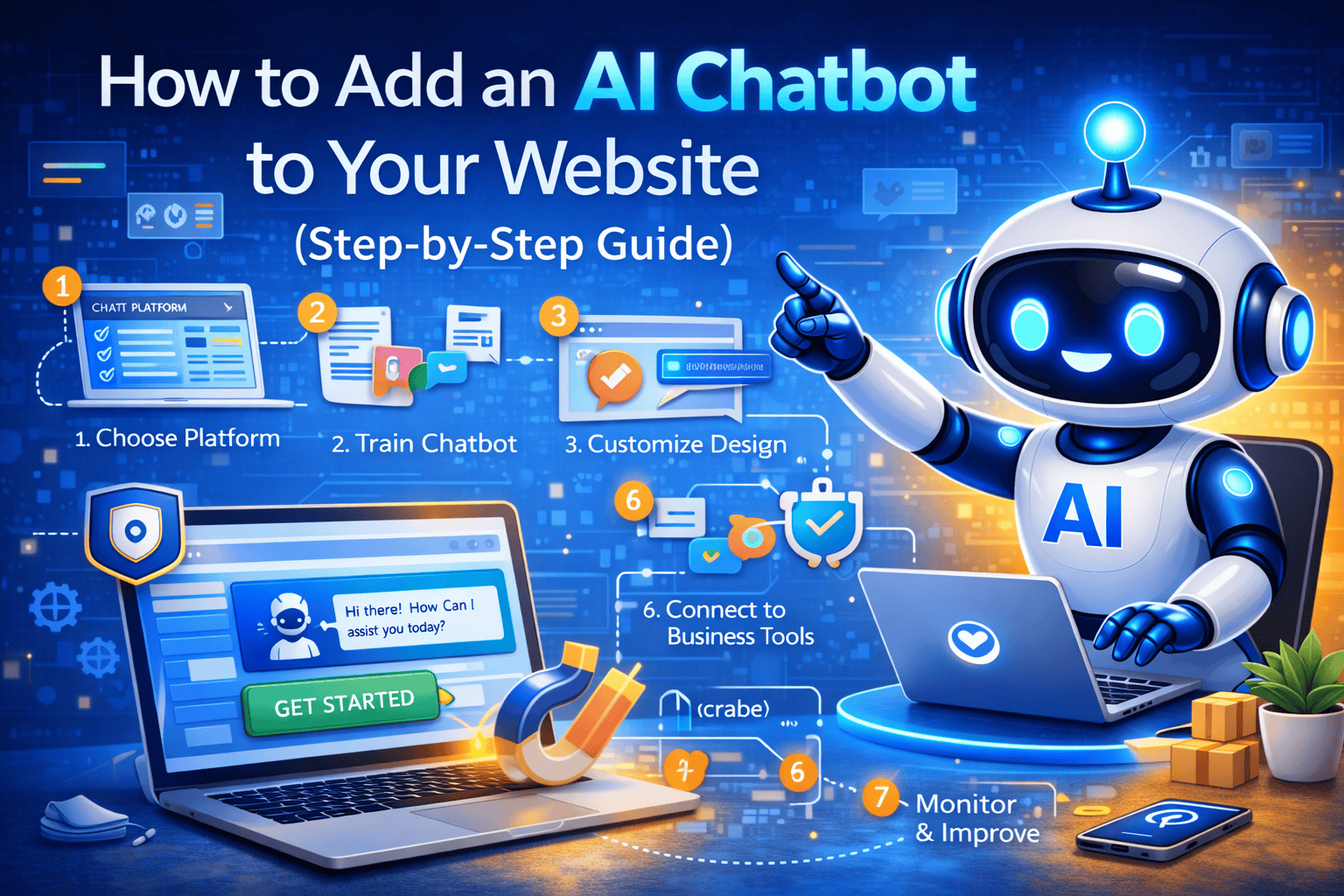
⚙️ Step 1: Choose the Right AI Chatbot Platform
The first step is selecting a chatbot platform that fits your business needs.
Some chatbots focus on simple automated responses, while others use advanced AI to understand conversations and provide intelligent answers.
When choosing a chatbot platform, look for features such as:
-
Natural language processing (AI understanding)
-
Lead capture forms
-
Integration with websites and apps
-
Customization options
-
Analytics and reporting
Choosing the right platform ensures the chatbot will work effectively for your website.
🧠 Step 2: Train the AI Chatbot with Your Business Information
AI chatbots need information to answer questions accurately.
Most platforms allow you to train the chatbot using your business content.
You can train your chatbot with:
-
Website pages
-
FAQs
-
Product information
-
PDF documents
-
Customer support knowledge
The more information you provide, the better the chatbot will perform.
🧩 Step 3: Customize the Chatbot Design
After training the chatbot, the next step is customizing its appearance so it matches your brand.
You can typically customize:
-
Chat widget color
-
Chatbot name and avatar
-
Welcome message
-
Suggested questions for users
A well-designed chatbot creates a more professional and engaging experience for visitors.
🔗 Step 4: Integrate the Chatbot with Your Website
Most AI chatbot platforms provide a simple integration method.
Usually, this involves adding a small script or plugin to your website.
Common integration methods include:
-
Copy and paste a chatbot script into your website
-
Install a WordPress plugin
-
Connect via website builder integrations
-
Use API integrations for custom websites
Once installed, the chatbot will appear as a chat widget on your website.
🛠 Step 5: Connect the Chatbot with Business Tools
Advanced AI chatbots can integrate with other business systems to automate workflows.
Popular integrations include:
-
CRM systems
-
Email marketing tools
-
eCommerce platforms
-
Customer support systems
-
Google Sheets or databases
These integrations help automate processes such as lead management and customer communication.
👨💼 Step 6: Enable Human Support When Needed
While AI chatbots are powerful, some conversations may require human assistance.
Many chatbot platforms allow human handoff, where the chatbot transfers the conversation to a support agent.
This ensures that complex issues can still be handled by a human representative.
📊 Step 7: Monitor and Improve Chatbot Performance
After launching your chatbot, it’s important to monitor its performance and improve it over time.
Analytics tools can show you:
-
Number of conversations
-
Most common user questions
-
Lead generation results
-
Customer satisfaction
Using this data, you can refine the chatbot’s responses and improve its effectiveness.
🚀 Benefits of Adding an AI Chatbot to Your Website
Once implemented properly, an AI chatbot can provide many advantages.
Key benefits include:
-
Faster customer support
-
Higher website engagement
-
Automated lead generation
-
Reduced operational costs
-
Improved customer satisfaction
These benefits make AI chatbots an important tool for modern websites.
🏁 Conclusion
Adding an AI chatbot to your website is one of the most effective ways to improve customer communication and automate business processes.
By choosing the right chatbot platform, training it with relevant information, and integrating it with your website, you can create a powerful tool that helps visitors find answers quickly and easily.
Businesses that adopt AI chatbot technology can provide better customer experiences while increasing efficiency and growth.
🚀 Add an AI Chatbot to Your Website Today
At Ozonetechno, we provide advanced AI chatbot solutions designed to help businesses automate conversations, capture leads, and improve customer engagement.
Our AI chatbot services include:
-
AI-powered website chatbots
-
Lead generation automation
-
Integration with business tools
-
Custom chatbot setup and support
👉 Contact us today to add a smart AI chatbot to your website.